How To - Audit Your Custom Theme
How to use the auditing tools to audit your custom theme.
The Audit tool scans your Custom CSS and Custom HTML for common issues and for rules that match MyOshi’s latest CSS/HTML sanitation behavior. This is currently a ‘best guess’ based on what they publicly announce, so it may not be perfect. It then produces a report with Errors, Warnings, and Info items, plus suggested fixes so you can correct problems before saving or sharing your theme.
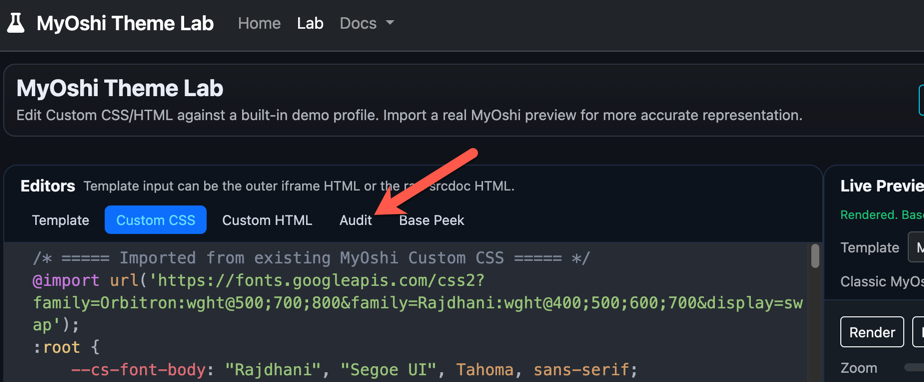
Where to find the Audit tool
The Audit tool lives next to the editor tabs (Custom CSS / Custom HTML), so you don’t need to dig through submenus.
Run an audit
- Paste or edit your Custom CSS and/or Custom HTML in their respective tabs.
- Click the Audit tab.
- Click Run Audit.
After the scan completes you’ll see:
- A summary line (counts of Errors / Warnings / Info)
- A detailed list of issues
- A badge on the Audit tab showing how many Errors were found
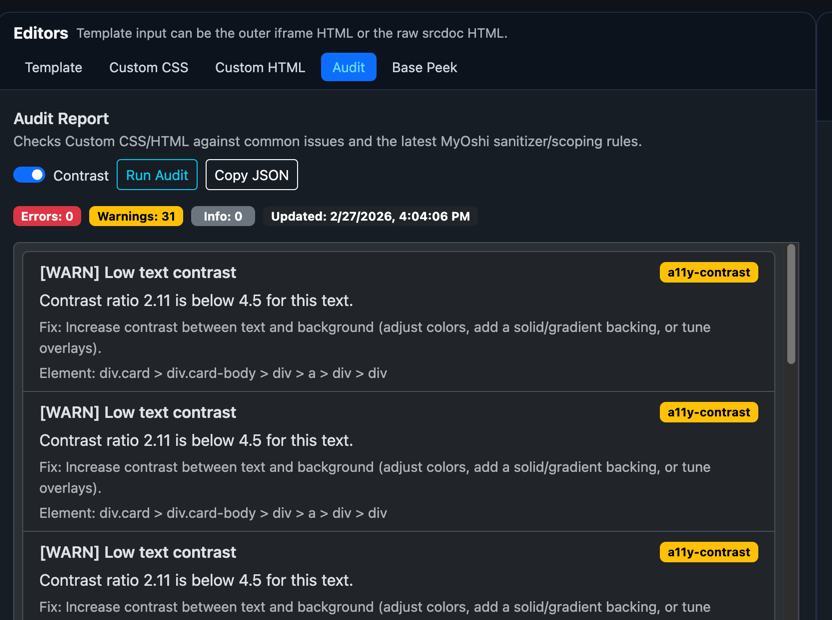
Optional: Run contrast checks (slower)
If you enable Contrast checks, the audit will try to detect low-contrast text by reading the preview’s computed styles.
This is slower than static checks because it needs a rendered preview.
Important limitation (preview sandbox)
If the preview iframe is sandboxed without same-origin access, the app may not be able to read computed styles. In that case, contrast checks may be skipped or show a note.
If you’re unsure whether contrast checks are active, run the audit and look for a message indicating whether contrast analysis was performed.
Understanding results
Each issue is labeled with a severity:
- Error: Very likely to be blocked, stripped, or broken on MyOshi.
- Warning: Allowed, but likely to behave differently on MyOshi (capped/converted), or likely to cause theme problems.
- Info: General suggestions or audit rule notes.
Each issue may include:
- A message explaining what was found
- A Fix hint describing how to correct it
- A Location (line/column) for CSS issues (when available)
- An Element path for HTML / accessibility issues (when available)
What the audit checks
CSS checks (MyOshi rules)
1) Manual scoping prefixes
MyOshi now scopes your selectors automatically, so manually scoping them can cause unexpected results.
Flagged examples
.profile-page .my-box { ... }
.profile-page.profile-custom-css h2 { ... }
Preferred
.my-box { ... }
h2 { ... }
2) position: fixed
MyOshi converts position: fixed to position: absolute for safety.
Flagged
.my-overlay { position: fixed; top: 0; left: 0; }Fix
- Use
position: absoluteinside a container you control (often withposition: relative) - Or use
position: stickyfor in-container “sticky” layouts
3) z-index cap
MyOshi caps z-index to 10000 (and -10000).
Flagged
.my-overlay { z-index: 999999; }Fix
- Keep
z-indexwithin [-10000, 10000] - Prefer small, consistent layers (e.g. 10 / 100 / 1000)
4) blur() cap
MyOshi caps filter: blur() and backdrop-filter: blur() at 50px.
Flagged
.bg { filter: blur(200px); }Fix
- Use values ≤ 50px
- If you need a “softer” look, consider gradients or layered translucent backgrounds
5) url() protocol allowlist
MyOshi only allows:
https:data:
Flagged
.bg { background-image: url(http://example.com/bg.png); }Fix
- Host assets over
https:// - Or embed small assets via
data:URIs
6) @import restrictions (fonts only)
@import is only allowed from whitelisted font hosts:
fonts.googleapis.comfonts.gstatic.comfonts.bunny.netuse.typekit.netcdnjs.cloudflare.com
Flagged
@import url("https://example.com/styles.css");Fix
- Import fonts only from allowed hosts
- Paste non-font CSS directly into Custom CSS (up to 50,000 characters)
7) Protected elements
Selectors that target MyOshi navigation/header/footer/etc. are stripped, including when nested in :is(), :where(), and :not().
Flagged
.header { display: none; }
.site-footer { opacity: 0; }
Fix
- Don’t target global site elements
- Only style within your profile container
8) Unsafe patterns
The audit flags known unsafe patterns like:
expression()javascript:usage
These will be blocked or stripped.
HTML checks (quality + accessibility)
1) Size limits
MyOshi enforces:
- Custom CSS: 50,000 characters
- Custom HTML: 50,000 characters
If you exceed limits, the audit marks this as an Error.
2) Missing alt text for images
Images without alt are flagged.
Fix
- Add descriptive
alt="..."for meaningful images - Use
alt=""for decorative images
3) Missing accessible names for controls
Buttons/links/inputs should have a readable label:
- Visible text, or
aria-label, oraria-labelledby, or<label for="...">(inputs)
Icon-only controls without labels are flagged.
4) Scripts and inline event handlers
The audit flags:
<script>tagsonclick=...and otheron*handlers
These are commonly removed by platform sanitizers and are generally unsafe.
5) Duplicate IDs
Repeated id="..." values can break CSS targeting and accessibility.
Fix
- IDs must be unique
- Use classes for repeated patterns
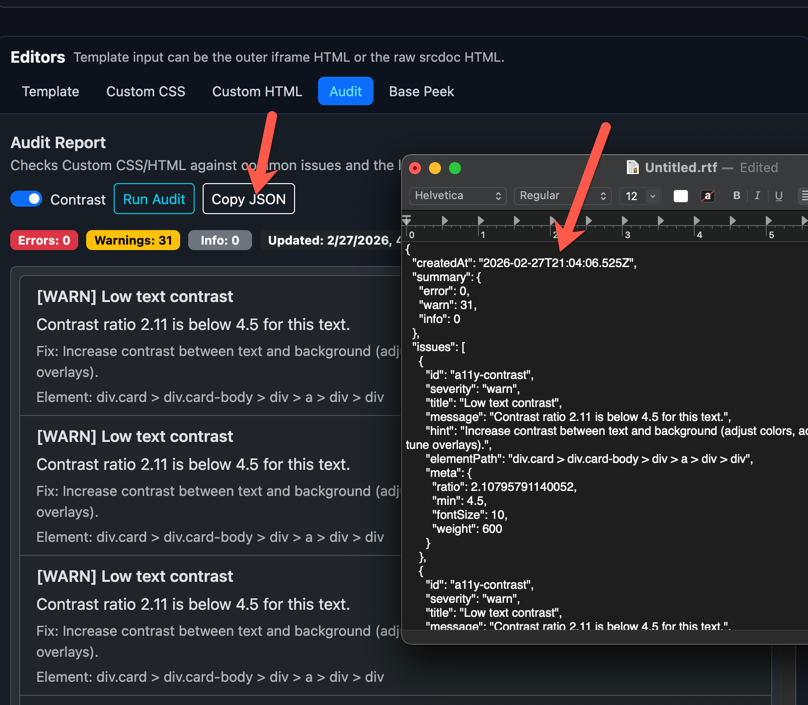
Copy the report (for sharing or support)
Use Copy JSON to copy the entire report (including metadata) to your clipboard. This is useful when:
- Asking for help in Discord
- Posting a bug report
- Keeping a changelog of fixes
Common fixes after MyOshi’s CSS rewrite
“My theme broke after the update”
Most often caused by:
- Manual scoping prefixes (
.profile-page,.profile-custom-css) - Reliance on
position: fixed - Extremely large
z-indexvalues
“My font stopped loading”
Most often caused by:
@importfrom a non-whitelisted host- Self-hosted font URLs (blocked)
“My background/image doesn’t show”
Most often caused by:
url()with non-https protocol- Invalid/blocked URL
Troubleshooting
I ran Audit, but nothing appears
- Make sure you are on the Audit tab and clicked Run Audit
- If you have no issues, you may see only a summary with 0 items
Contrast checks don’t report anything
- Contrast checks require access to computed styles in the preview
- If the preview is sandboxed without same-origin access, contrast analysis may be skipped
Best practices
- Run Audit before saving major updates
- Fix Errors first, then Warnings
- Keep z-index and blur values within recommended ranges to match live behavior
- Add
alttext and accessible labels so themes are usable for everyone